AI Property Slideshow Generator for Listings
Order your listing photos into a branded slideshow video — you set the sequence, the tool adds transitions, timing, and music in seconds.
What it does
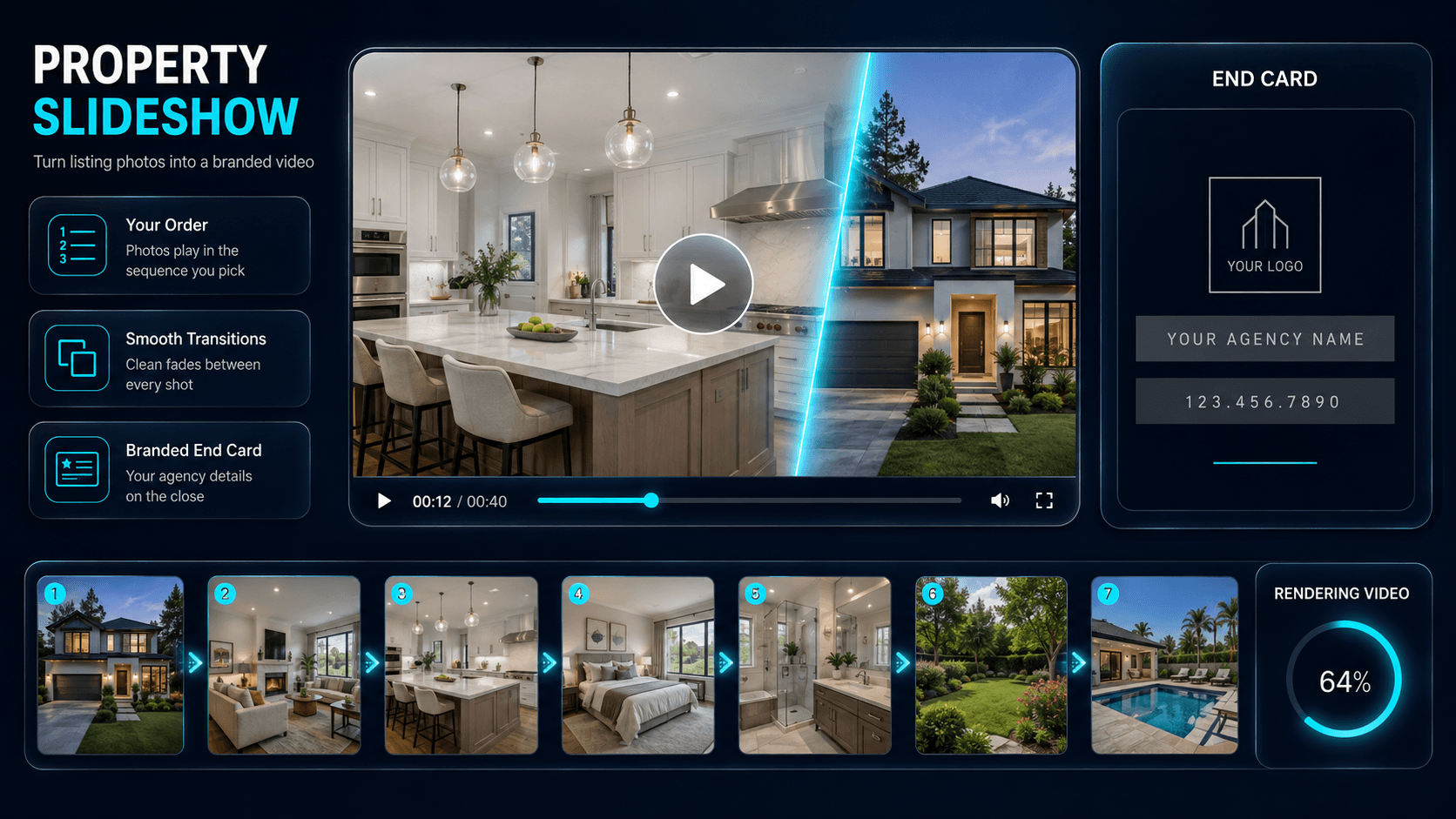
The Property Slideshow Generator turns a set of listing photos into a branded slideshow video that plays through the property one shot at a time. You upload the images for a listing and arrange them in the order you want them to appear, and the tool builds them into a smooth video — adding transitions between frames, timing each photo on screen, and letting you add music and your agency branding so the finished clip is ready to publish. You control the sequence; the tool handles the transitions, pacing, and export. Instead of pushing stills into a separate video editor, you get a share-ready property video from the same photos you already market with.
Video is how most buyers now scroll — on Instagram Reels, TikTok, Facebook, and YouTube — and a slideshow is the fastest way to turn a still gallery into that format. Because the slideshow draws on the same images you enhance elsewhere in Enhancia, it slots straight into a listing-media workflow: enhance each photo with the AI Real Estate Photo Enhancer, Day to Dusk, or Virtual Staging first, then order the finished set into a moving slideshow of the home.
In one line: The Property Slideshow Generator turns the listing photos you order into a branded slideshow video — with transitions, music, and agency branding, ready to post.
Who it’s for
- Real estate agents who want a video-first post for Instagram Reels, TikTok, and Facebook — a slideshow that earns more reach than a single still.
- Property photographers adding a ready-made slideshow video to a media package alongside the enhanced stills, delivering more value from the same shoot.
- Property managers and short-term rental hosts producing quick, repeatable listing videos for rentals and Airbnb stays that show the whole space in a few seconds of scroll.
- Property marketing teams creating consistent content across a portfolio of listings, at volume and without an editing bottleneck.
How it works
- 1Select the dedicated Property Slideshow Generator tab in your project.
- 2Upload the photos for a listing and arrange them in the order you want them to play — exterior, interiors, and feature shots, in the sequence that tells the property’s story.
- 3Choose your music, and Enhancia builds your ordered photos into a slideshow video with transitions and timing applied.
- 4Review the video, then download it, or reorder your photos and regenerate for a different flow or style.
Inputs & outputs
Limitations & things to check
- The Property Slideshow Generator sequences existing photos into a video. It doesn’t enhance the individual images — run them through the AI Real Estate Photo Enhancer, Day to Dusk, or Declutter first so the slideshow is built from your best versions.
- A slideshow is a still-photo video, not filmed footage or a walkthrough tour. It’s built for fast, scroll-friendly marketing, not to replace a professional property videographer where one is expected.
- The order and pacing carry the story, and you set the order. Arrange the photos in a logical sequence — arrive at the exterior, move through the living spaces, finish on a feature — and review the timing so no shot feels rushed or held too long.
- If you add music, make sure you have the right to use the track on the platforms you’re posting to. Each image should represent the property accurately — check your local disclosure requirements before publishing edited or composed media.
Frequently asked questions
What is a property slideshow generator?
A property slideshow generator is a tool that turns a set of listing photos into a slideshow that plays through them one at a time. With Enhancia’s version you arrange your images in the order you want, and the tool adds transitions and timing and lets you include music and agency branding — producing a share-ready property video without a separate video editor.
Do I choose the order the photos play in?
Yes. You set the sequence — arrange the photos in the order you want them to appear, so you control how the walkthrough flows. The tool then applies the transitions, on-screen timing, music, and branding around the order you’ve chosen. You can reorder and regenerate at any time.
What kind of video does it produce?
A branded slideshow video: your listing photos in the order you set, with smooth transitions between frames, timed on-screen duration, optional background music, and your branding. The output is an MP4 you can post to social feeds, portals, and listing pages.
Where can I use the slideshow video?
Anywhere video-first content performs: Instagram Reels, TikTok, Facebook, YouTube, an email campaign, or embedded on a listing page. Short slideshow videos are especially effective on feeds that favour video over still images.
Do I need video-editing skills to make one?
No. There’s no timeline to edit and no software to learn. You arrange the photos in order, choose branding and music, and the tool builds the video — no video-editing experience required.
Should I enhance my photos before making the slideshow?
Ideally, yes. The slideshow generator sequences the images you give it; it doesn’t retouch them. For the best result, enhance each photo first with tools like the AI Real Estate Photo Enhancer, Day to Dusk, Virtual Staging, or Declutter, then build the slideshow from the finished versions.
How is this different from the Property Photo Collage Maker?
The Property Slideshow Generator produces a video that plays through your photos in sequence. The Property Photo Collage Maker produces a single still image with several photos arranged in one frame. Many agents use both — a slideshow for video-first feeds like Reels and TikTok, a collage for a static post or thumbnail.
Can I use it for rentals and short-term stays, not just sales?
Yes. A slideshow works for any listing type — sales, rentals, and Airbnb or short-stay properties. It’s an efficient way to show a whole space in a few seconds for audiences that scroll quickly.
Related tools
Property Photo Collage Maker
Pick your listing photos and get one balanced property collage — the tool arranges your chosen shots into a clean layout for you.
AI Real Estate Photo Enhancer
Our AI real estate photo enhancer gives you targeted control over the issues that make listing photos feel unfinished. Upload a property image, choose the edit it actually needs, and we improve that specific part of the photo — from colour and white balance to perspective, sky, clutter, facade presentation, or resolution. Instead of pushing one generic filter across the whole image, we help you refine the photo in focused passes, review the result, and keep building toward a clean, listing-ready finish.
Add Branding
We make real estate photo branding simple by helping you apply agency branding to property images so listings, social posts, and campaign assets carry a consistent visual identity.
More resources
Read related guides in the Enhancia Knowledge Base, or see full pricing details on the pricing page.