AI Property Photo Collage Maker for Listings
Pick your listing photos and get one balanced property collage — the tool arranges your chosen shots into a clean layout for you.
What it does
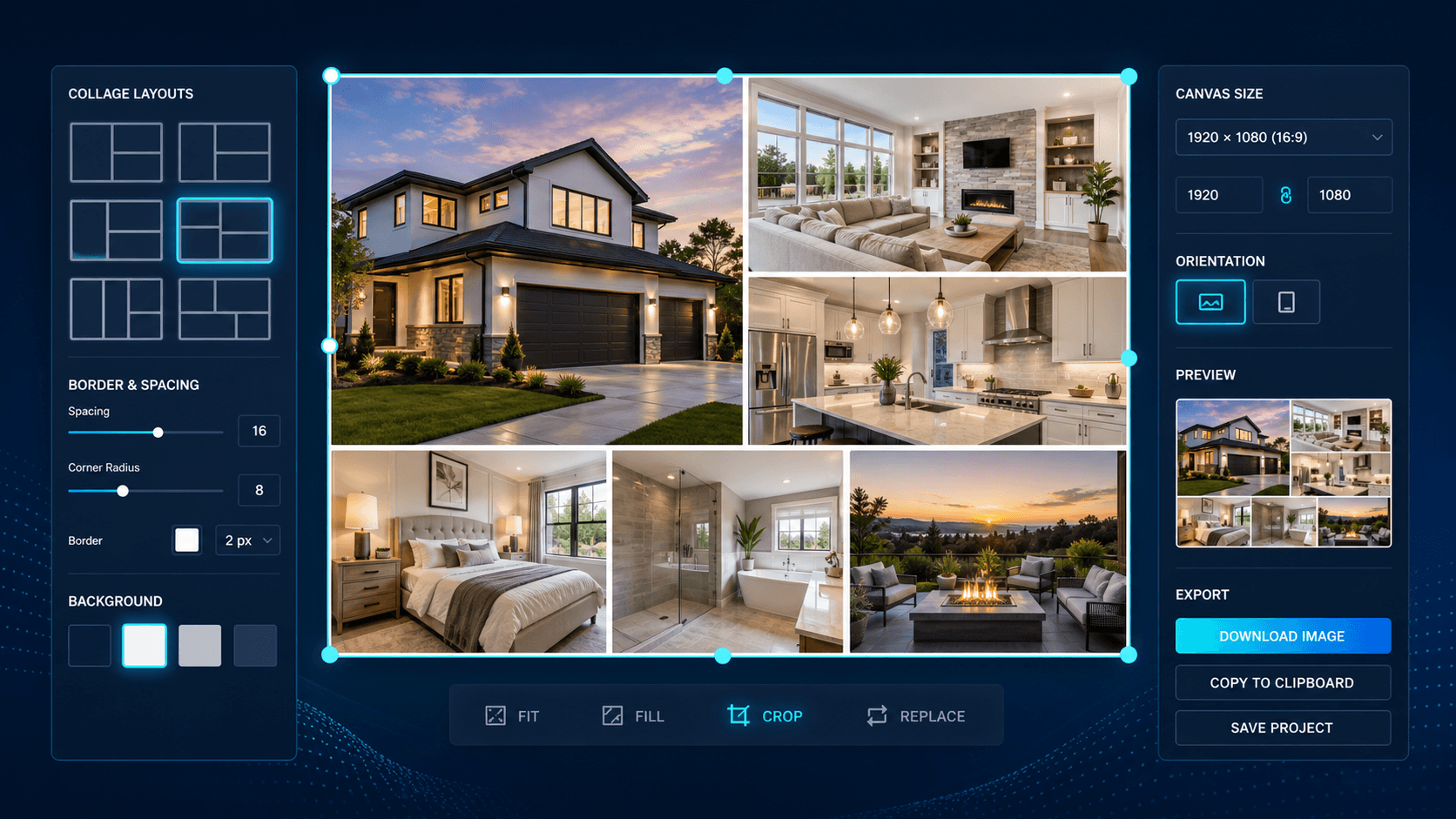
The Property Photo Collage Maker combines the property photos you choose into one clean, well-composed collage image. You select the shots you want in the collage — a hero exterior, the kitchen, the living area, the main bedroom, the pool or backyard — and the tool arranges them into a balanced grid that reads clearly at a glance. It sizes and crops each image to fit its cell, keeps the composition even, and outputs a single marketing-ready collage for social feeds, portal galleries, and printed flyers. You stay in control of which photos go in; the tool handles the layout.
Because the collage draws on the same photos you enhance elsewhere in Enhancia, it fits straight into an existing listing-media workflow. Run your images through the AI Real Estate Photo Enhancer, Day to Dusk, Virtual Staging, or Declutter first, then hand the finished set to the collage maker and pick the ones to feature — no design software, no manual layout, and no fiddling with margins.
In one line: The Property Photo Collage Maker arranges the listing photos you pick into one balanced property collage — for social portals and print.
Who it’s for
- Real estate agents who want a single scroll-stopping image that summarises a whole listing — exterior, key rooms, and standout features in one frame — for Instagram, Facebook, and portal thumbnails.
- Property photographers delivering a media package who want to add a ready-made collage alongside the individual high-resolution photos, without opening a design app.
- Property managers and short-term rental hosts promoting rentals and Airbnb stays who need an at-a-glance summary image that shows the space quickly to busy scrollers.
- Property marketing teams producing consistent, on-brand collage layouts across a portfolio of listings, at volume and without a design bottleneck.
How it works
- 1Select the dedicated Property Photo Collage Maker tab in your project.
- 2Select the shots you want in the collage from the uploaded and edited photos in Enhancia folder — exterior, interiors, and feature shots for the one listing.
- 3Enhancia arranges the photos you chose into a balanced, well-cropped collage layout.
- 4Review the collage, then download it, or adjust your photo selection and regenerate for a different arrangement.
Inputs & outputs
Limitations & things to check
- The Property Photo Collage Maker composes the photos you select into a layout. It doesn’t enhance the individual images — run them through the AI Real Estate Photo Enhancer, Day to Dusk, or Declutter first so the collage is built from your best versions.
- You choose the photos, so the result is only as strong as the shots you pick. Select a varied set — exterior, main rooms, and a feature shot — for the most balanced collage.
- Cropping to fit a grid can trim the edges of a photo. Review the final collage to confirm the key part of each room or feature is still clearly visible before you publish.
- A collage is a presentation format, not a substitute for the full photo set. Buyers still expect the complete gallery on the listing, and each image should represent the property accurately — check your local disclosure requirements before publishing edited or composed images.
Frequently asked questions
What is a property photo collage maker?
A property photo collage maker is a tool that combines several listing photos into a single, well-composed image. Enhancia’s version arranges the shots you select into a balanced collage automatically — ready for social media, property portals, and print marketing, with no design software.
Do I choose which photos go in the collage?
Yes. You pick the shots you want featured — typically a hero exterior plus key rooms and features — and the tool arranges them into a balanced layout. You stay in control of the selection; the tool handles the composition, cropping, and sizing.
Where can I use the finished collage?
Anywhere a single summary image helps: Instagram and Facebook posts, a portal listing thumbnail or gallery cover, an email campaign, or a printed flyer or brochure. The output is sized to work across social, portal, and print use.
Do I need design or Photoshop skills to make a collage?
No. There’s no canvas to lay out and no margins to adjust. You select the photos, the tool builds the collage, and you download a finished image — no design software and no manual editing required.
Should I enhance my photos before making the collage?
Ideally, yes. The collage maker composes the images you give it; it doesn’t retouch them. For the best result, enhance each photo first with tools like the AI Real Estate Photo Enhancer, Day to Dusk, Virtual Staging, or Declutter, then combine the finished versions into the collage.
How is this different from the Property Slideshow Generator?
The Property Photo Collage Maker produces a single still image with several photos arranged in one frame. The Property Slideshow Generator turns your listing photos into a branded slideshow video that plays through them in sequence. Many agents use both — a collage for a static post, a slideshow for video-first feeds like Reels and TikTok.
Can I use it for rentals and short-term stays, not just sales?
Yes. A collage works for any listing type — sales, rentals, and Airbnb or short-stay properties. It’s an efficient way to summarise a space in one image for audiences that scroll quickly.
Related tools
Property Slideshow Generator
Order your listing photos into a branded slideshow video — you set the sequence, the tool adds transitions, timing, and music in seconds.
AI Real Estate Photo Enhancer
Our AI real estate photo enhancer gives you targeted control over the issues that make listing photos feel unfinished. Upload a property image, choose the edit it actually needs, and we improve that specific part of the photo — from colour and white balance to perspective, sky, clutter, facade presentation, or resolution. Instead of pushing one generic filter across the whole image, we help you refine the photo in focused passes, review the result, and keep building toward a clean, listing-ready finish.
Add Branding
We make real estate photo branding simple by helping you apply agency branding to property images so listings, social posts, and campaign assets carry a consistent visual identity.
More resources
Read related guides in the Enhancia Knowledge Base, or see full pricing details on the pricing page.