AI Declutter for Real Estate Photos
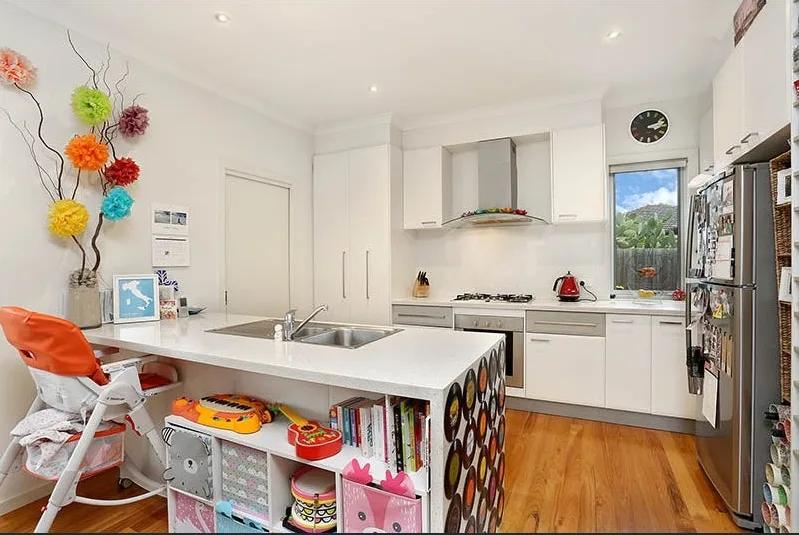
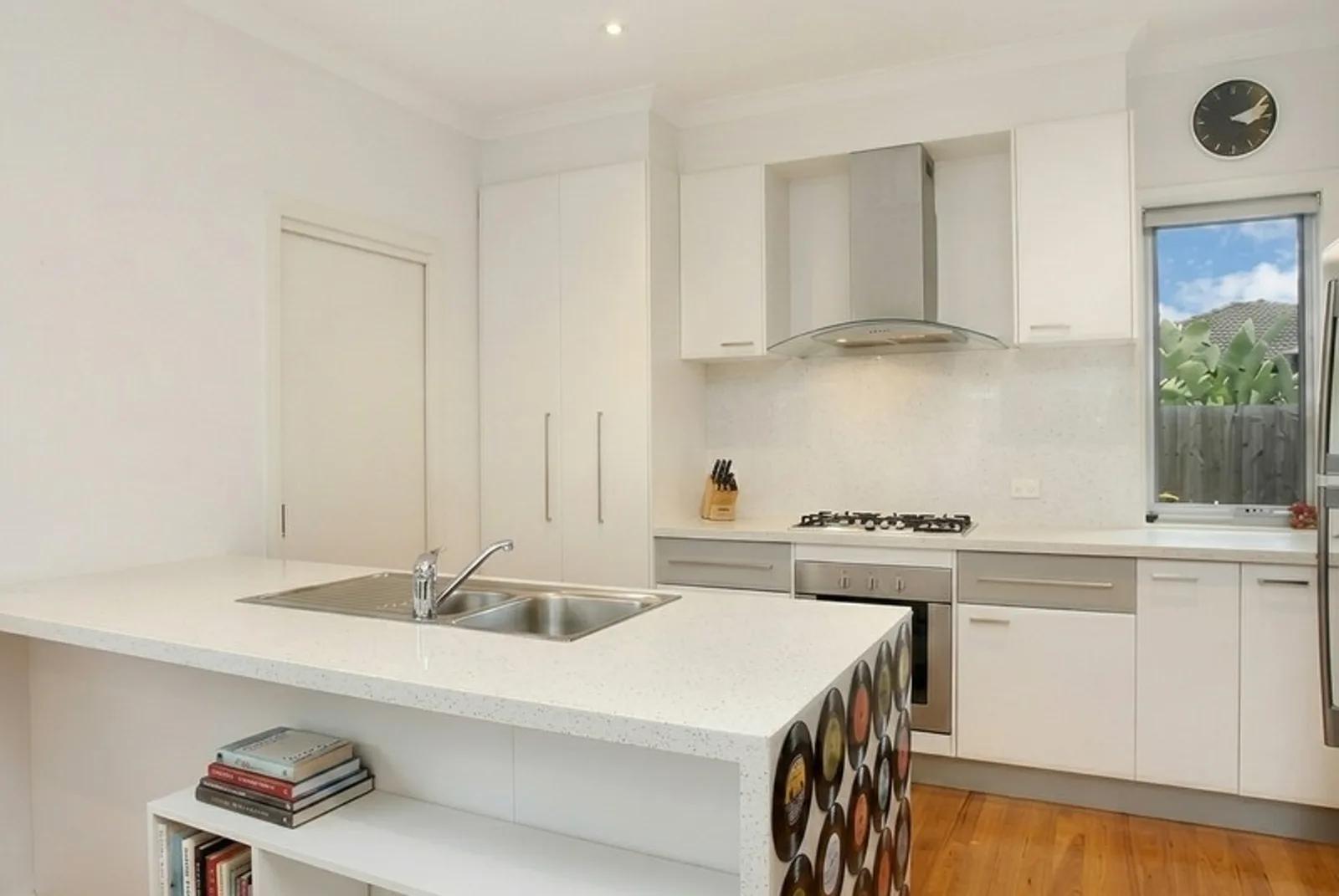
Our AI declutter tool tidies up your listing photos by removing the small, distracting items that pull attention away from the room — without moving your furniture or changing the layout. Upload a photo of a lived-in space, and we clear the clutter: the stray shoes, the benchtop mess, the fridge magnets, the laundry basket in the corner. What’s left is a clean, tidy version of the same room, ready for your listing in seconds. No staging day, no tidying up on site, no Photoshop.
What Is AI Photo Decluttering?
AI photo decluttering is a real estate photo retouching process that digitally removes small, distracting objects from a room while leaving the furniture and layout in place. It’s the light-touch clean-up: instead of emptying the room, we simply tidy it — clearing the everyday mess that makes a space feel cramped or untidy — and reconstruct the surface behind each item so nothing looks erased. You upload the photo, and we hand back a neat, buyer-ready version of the same room.
Decluttering sits at the heart of good real estate photo retouching. Buyers judge a listing in seconds, and a tidy, distraction-free photo lets them focus on the space itself rather than the stuff in it — which is exactly what you want a hero shot to do.
How to Declutter a Photo
Cleaning up your photo takes three steps and no editing experience:
- 1Upload your photo — Add a picture of the lived-in room, straight from your phone or camera.
- 2Declutter the room — We detect the small distracting items, remove them, and rebuild the surface underneath.
- 3Download or refine — Save your tidy, clutter-free photo in high resolution, or regenerate for a cleaner pass.
The finish matters as much as the removal. When we take out a mug or a magnet, we reconstruct the benchtop, wall, or floor behind it so the result looks naturally clean — never smudged or patched. Your furniture, fixtures, and the room’s whole layout stay exactly where they were.
Why a Tidy Photo Wins More Buyers
Clutter is the quiet killer of listing photos. It shrinks rooms, dates a home, and pulls the eye away from the features you’re trying to sell. Here’s why agents, photographers, and property managers declutter before they publish:
- Rooms look bigger and calmer — Clearing surface clutter opens up a space and lets its size show.
- Buyers focus on the property — With distractions gone, the eye lands on the room, not the mess.
- Photograph occupied homes as-is — Tidy a lived-in or tenanted property in the photo, without a physical clean-up on site.
- Faster than a staging day — Skip the on-site tidying and get publish-ready photos in seconds.
- A polished, professional listing — Clean photos signal a well-cared-for home and a switched-on agent.
What We Can Tidy Away
Decluttering works across interior spaces, clearing the small, movable items that clutter a shot while keeping your furniture in place:
- Kitchens — benchtop clutter, dish racks, fridge magnets, and stray appliances.
- Living rooms — remotes, cables, toys, and scattered decor.
- Bedrooms — laundry, bedside clutter, and personal items.
- Bathrooms — toiletries, bins, and countertop odds and ends.
Declutter, Furniture Removal, and Virtual Staging
These tools are related, and knowing which to reach for saves you time:
- Declutter is the light touch — we remove small distracting items and keep your furniture and layout exactly as they are.
- Furniture removal goes further — we take out whole pieces of furniture to leave a clean, empty room.
- Virtual staging adds furniture to an empty room so buyers can picture it furnished.
Use declutter when the room is furnished and just needs tidying. If you’d rather empty it completely, reach for furniture removal, and if you want to re-furnish an empty room, use virtual staging.
Inputs & Outputs
Keep Your Listings Honest
- Decluttering is about presentation, not concealment. We tidy away small, movable items so buyers can see the space clearly — we don’t hide permanent features, damage, or anything a buyer would reasonably expect to see. Your room’s structure, dimensions, fixtures, and furniture stay exactly as they are. Used this way, a decluttered photo is simply your property shown at its tidy best, the way it would look on a well-kept day.
Frequently Asked Questions
What is AI decluttering in real estate photos?
AI decluttering is a real estate photo retouching process that digitally removes small, distracting items from a room while keeping the furniture and layout in place. It gives you a tidy, buyer-ready photo without an on-site clean-up.
How do I declutter a photo?
Upload a photo of the room, let us detect and remove the clutter, and download the tidy result. We rebuild the surfaces behind each item so it looks naturally clean, all in seconds and with no editing skills.
What is the difference between decluttering and furniture removal?
Decluttering removes small, movable items and keeps your furniture in place. Furniture removal takes out whole pieces to leave an empty room. Reach for declutter when a furnished room just needs tidying.
Is decluttering the same as photo retouching?
Decluttering is one part of real estate photo retouching. Retouching is the broader clean-up of a listing image, and removing distracting clutter is one of the most common and highest-impact retouching edits.
Is there a free way to declutter photos with AI?
Yes. We give you 10 free credits when you start, so you can try AI decluttering before buying any credits.
Does decluttering change the room itself?
No. We only remove small, movable items. Your furniture, fixtures, walls, and the room’s layout stay exactly as they appear in your original photo.
Related Tools
Remove Furniture
Our AI furniture removal tool digitally clears furniture out of your room photo, leaving a clean, empty space that shows your property at its full potential. Upload a picture of a furnished or cluttered room, and we remove the pieces you don’t want on show — sofas, beds, tables, and everyday clutter — then rebuild the floor, walls, and light behind them so your result looks like the room was photographed empty. No moving, no mess, just a clean listing photo in seconds.
AI Real Estate Photo Enhancer
Our AI real estate photo enhancer gives you targeted control over the issues that make listing photos feel unfinished. Upload a property image, choose the edit it actually needs, and we improve that specific part of the photo — from colour and white balance to perspective, sky, clutter, facade presentation, or resolution. Instead of pushing one generic filter across the whole image, we help you refine the photo in focused passes, review the result, and keep building toward a clean, listing-ready finish.
More resources
Read related guides in the Enhancia Knowledge Base, or see full pricing details on the pricing page.